What is ECS in AWS?
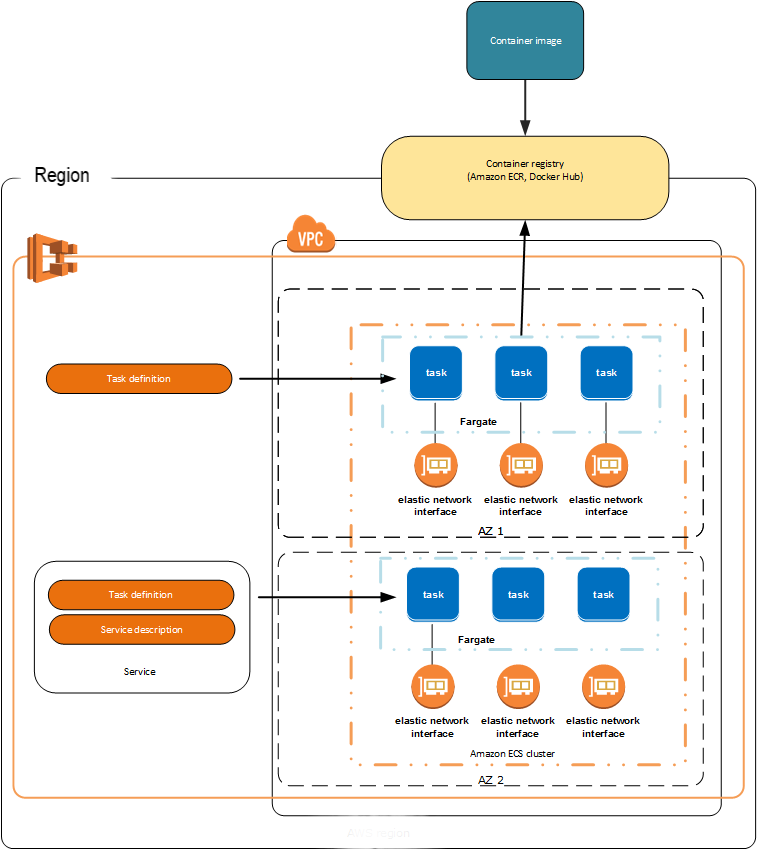
ECS stands for Amazon Elastic Container Service.
It is a fully managed container orchestration service provided by Amazon Web Services.
In simple terms
ECS helps you run, manage, and scale Docker containers on AWS without worrying about the underlying infrastructure.
If Docker is about building containers, ECS is about running them in production.
Why do we need ECS?
Without ECS
You manually run containers on EC2
You manage scaling, restarts, failures
With ECS
AWS schedules containers automatically
Handles container failures
Easy scaling and load balancing
Integrated with IAM, ECR, CloudWatch
ECS core components (very important)
1. Cluster
A logical group where containers run.
Example:
my-ecs-cluster
2. Task Definition
Blueprint of your container.
Defines:
Docker image (from ECR)
CPU and memory
Port mappings
Environment variables
3. Task
A running instance of a task definition.
4. Service
Keeps tasks running continuously.
Example:
Run 2 containers all the time.
5. Launch Types
EC2 Launch Type
You manage EC2 instances
You install ECS agent
More control
Fargate Launch Type
No EC2 management
Serverless containers
Pay only for runtime
ECS vs Kubernetes (quick)
| ECS | Kubernetes |
| AWS native | Cloud agnostic |
| Easier to start | More complex |
| Deep AWS integration | Steep learning curve |
Real-life example
You have:
Spring Boot app
Docker image in ECR
Want to deploy it on AWS
Flow:
Git → Jenkins → Docker image → ECR → ECS → Load Balancer → Users
ECS Setup Step by Step (using Fargate)
Prerequisites
AWS account
Docker image pushed to ECR
IAM role for ECS
VPC with subnets
Step 1: Create ECS Cluster
Go to ECS Console
Click Create Cluster
Select Networking only (Fargate)
Cluster name:
demo-ecs-clusterCreate cluster
Step 2: Create Task Definition
Go to Task Definitions
Create new → Fargate
Configure:
Task name:
demo-taskCPU: 0.5 vCPU
Memory: 1 GB
Container config:
Image:
123456789012.dkr.ecr.ap-south-1.amazonaws.com/my-app:latestPort: 8080
Step 3: Create Service
Create service from task definition
Launch type: Fargate
Service name:
demo-serviceNumber of tasks: 1
Networking:
Public IP: Enabled
Security group: allow 8080
Create service
Step 4: Access Application
Use public IP or ALB DNS:
http://<public-ip>:8080
ECS with EC2 (short)
Create EC2 with ECS-optimized AMI
Register EC2 to ECS cluster
Run tasks on EC2 capacity
ECS Pricing (idea)
Fargate: Pay per CPU & memory used
EC2: Pay for EC2 instances
Common interview lines
ECS is AWS-managed container orchestration
Task Definition defines container config
Service ensures desired number of tasks
Fargate removes server management
When to use ECS?
You are on AWS
You want simple container orchestration
You don’t want Kubernetes complexity