AWS Auto Scaling.
AWS Auto Scaling is a service that automatically increases or decreases EC2 instances based on traffic and load.
It makes your application scalable, cost-efficient, and highly available.
Think of Auto Scaling like:
Adding or removing servers automatically when users increase or decrease.
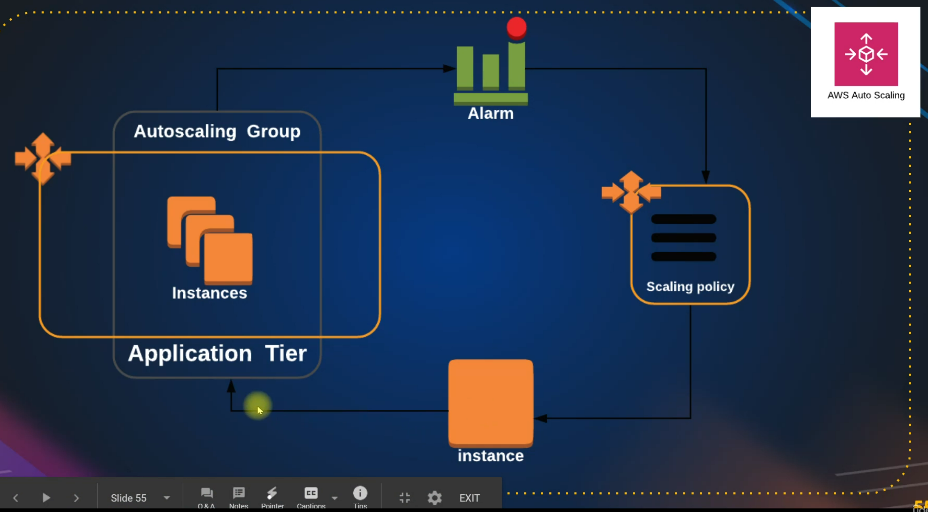
Why Auto Scaling is used
Auto Scaling is used to:
Handle traffic spikes
Avoid server overload
Save cost
Improve availability
Run applications without manual intervention
Where Auto Scaling is used
Auto Scaling is used in:
Web applications
E-commerce websites
APIs
SaaS platforms
Production systems
Microservices
Cloud applications
When to use Auto Scaling
Use Auto Scaling when:
Traffic is unpredictable
You want zero downtime
You want automatic scaling
You want high availability
You want to pay only for what you use
Core Components of Auto Scaling
1. Launch Template
This defines:
AMI
Instance type
Key pair
Security groups
User data
It tells AWS how to create new EC2 instances.
2. Auto Scaling Group (ASG)
This is a group of EC2 instances that:
Increases
Decreases
Replaces unhealthy instances
You set:
Minimum
Desired
Maximum number of instances
3. Scaling Policies
These decide:
- When to add or remove EC2
Types:
Target tracking
Step scaling
Simple scaling
4. CloudWatch Metrics
ASG uses:
CPU utilization
Network
Requests count
to decide scaling.
How Auto Scaling works
Traffic increases → CPU goes high
CloudWatch sends alarm
ASG launches new EC2
ELB starts sending traffic to new EC2
Traffic decreases → ASG terminates extra EC2
Auto Scaling with Load Balancer
ASG is mostly used with:
- Application Load Balancer
So traffic is evenly distributed.
Health Checks
Auto Scaling checks:
EC2 status
ELB health
If an instance fails:
ASG deletes it
New one is launched automatically
Availability Zones
ASG can launch EC2 in:
- Multiple AZs
So if one AZ fails, others still run.
Cost benefit
You pay only for:
- Running instances
When traffic drops, instances are removed.
Real world example
E-commerce site
Morning: 2 servers
Sale time: 20 servers
Night: back to 2
All automatic.
DevOps usage
Auto Scaling is used for:
High availability
CI/CD environments
Blue-green deployment
Disaster recovery
Cost optimization
Auto Scaling vs Load Balancer
| Auto Scaling | Load Balancer |
| Controls number of servers | Distributes traffic |
| Launches & terminates EC2 | Routes requests |
Both are used together.
Interview points
Works with CloudWatch
Uses Launch Template
Supports ELB
Automatic healing
Multi AZ support