Flow of CI Pipeline
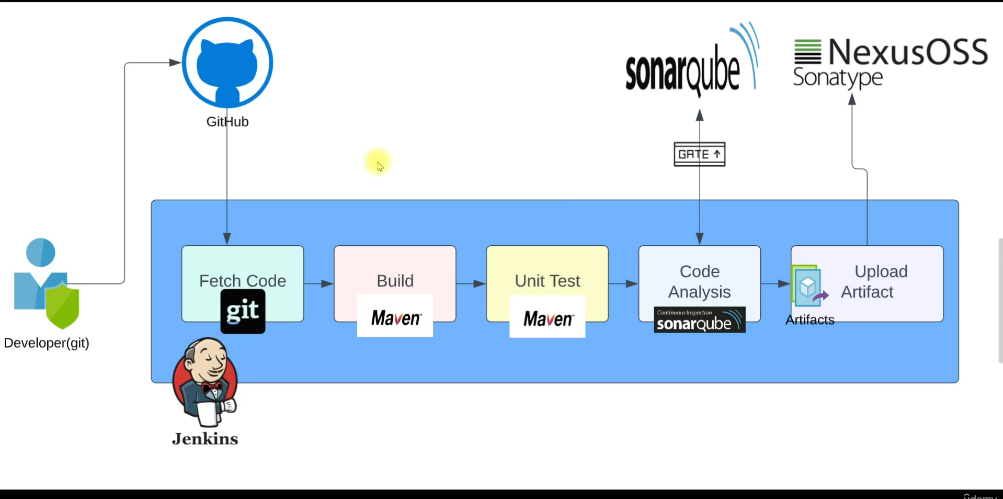
1. Code Commit (Starting Point)
The CI pipeline starts when a developer writes code and pushes it to a version control system like Git.
What happens:
Developer makes changes
Runs basic checks locally
Pushes code to Git repository (GitHub / GitLab / Bitbucket)
Why this matters:
CI ensures every code change is tested automatically
No waiting for manual builds
2. Trigger the CI Pipeline
Once code is pushed, the CI tool (like Jenkins) detects the change.
How it triggers:
Webhook from Git
Poll SCM (not recommended)
Manual trigger (for testing)
Result:
- A new CI job starts automatically
3. Source Code Checkout
The pipeline pulls the latest code from the repository.
Actions:
Clones the repo
Checks out the correct branch (main, develop, feature branch)
Why:
CI always works on fresh code
Avoids local machine dependency
4. Environment Setup
Before building, the pipeline prepares the environment.
Includes:
Installing dependencies
Setting up language runtime (Java, Node, Python)
Loading environment variables
Injecting credentials securely
Example:
Node modules install
Maven dependencies download
Purpose:
- Makes builds repeatable and consistent
5. Build Stage
Now the actual build happens.
Examples:
Java:
mvn clean packageReact:
npm run buildPython: create package or artifact
Output:
- Build artifacts (JAR, WAR, ZIP, dist folder)
Why:
- Converts source code into deployable format
6. Automated Testing
This is the core of CI.
Types of tests:
Unit tests
Integration tests
Basic smoke tests
What happens:
Tests run automatically
Pipeline stops if any test fails
Why:
Catches bugs early
Prevents broken code from moving forward
7. Code Quality & Security Checks (Optional but Strong)
Many teams add quality gates.
Includes:
Static code analysis
Code coverage checks
Security scans
Tools:
SonarQube
ESLint
Snyk
Purpose:
Maintains code standards
Reduces technical debt
8. Artifact Versioning & Storage
After a successful build:
Artifacts are versioned using build number or commit ID
Stored in artifact repositories
Examples:
Nexus
Artifactory
S3
Why:
Traceability
Rollback support
9. Notifications
The pipeline sends build status to the team.
Examples:
Slack message
Email
Git status update
Purpose:
Immediate feedback
Team visibility
10. CI Pipeline End
At this point:
Code is built
Tested
Verified
If all stages pass:
CI pipeline succeeds
Code is ready for CD (deployment)
If any stage fails:
Pipeline stops
Developer fixes the issue and pushes again
CI Pipeline Flow in One Line
Code Commit → Trigger → Checkout → Setup → Build → Test → Quality Check → Artifact Store → Notify
CI vs CD (Quick clarity)
CI stops at build + test
CD continues with deployment to staging or production
Interview-Ready Summary
A CI pipeline automates code integration by building, testing, and validating every code change, ensuring fast feedback, high code quality, and stable software delivery