What is CI/CD in DevOps (Part 1)
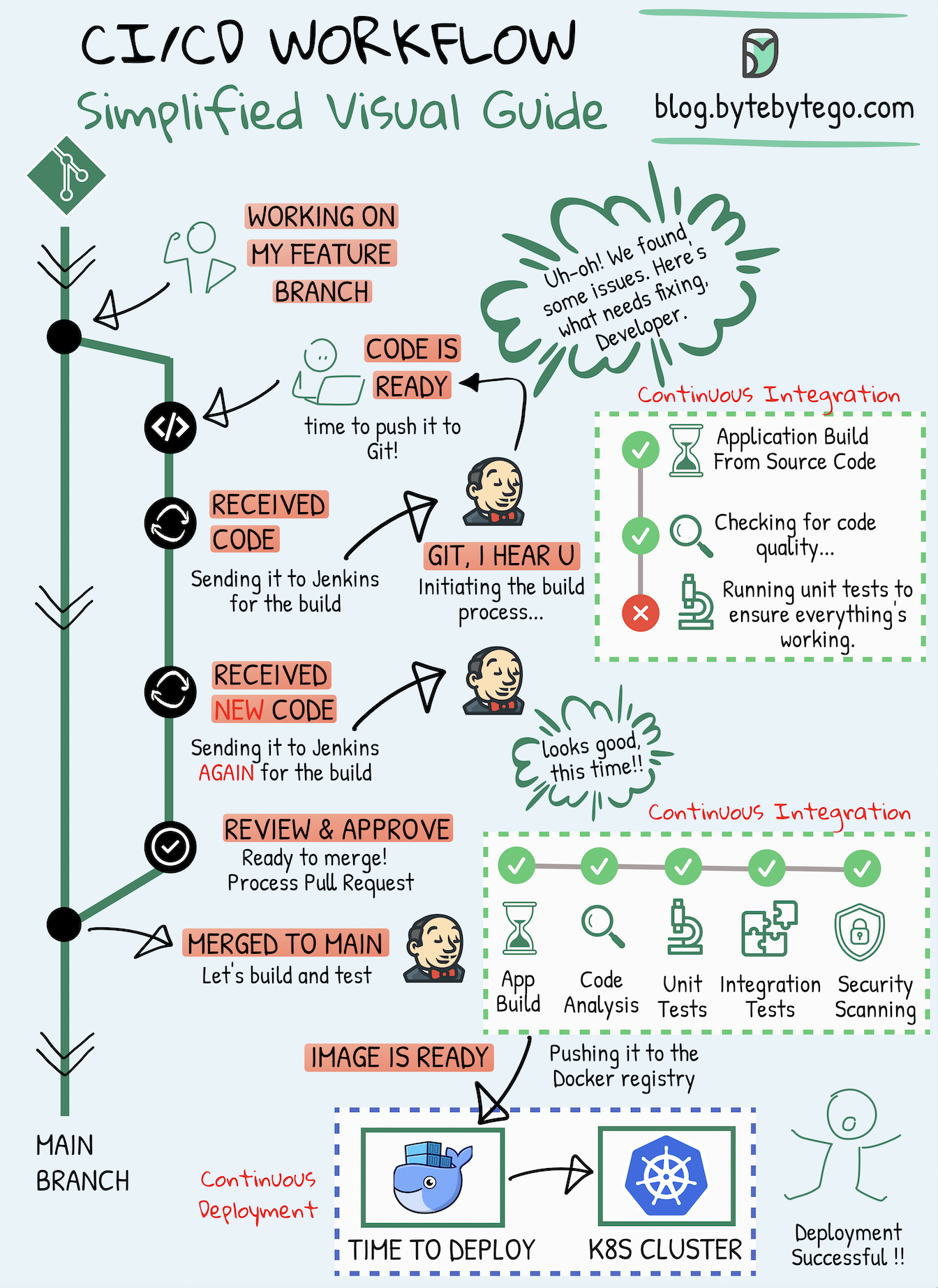
What is CI/CD in DevOps
CI/CD is the backbone of modern DevOps practices. It is a process that helps teams build, test, and deploy software faster, more reliably, and with fewer errors.
CI/CD stands for:
CI – Continuous Integration
CD – Continuous Delivery or Continuous Deployment
Together, they automate the journey of code from a developer’s system to production.
Why CI/CD is Needed
Before CI/CD, teams faced common problems:
Manual deployments were slow and error-prone
Bugs were found late, sometimes in production
Developers worked in isolation, causing merge conflicts
Releases happened once in weeks or months
CI/CD solves these by automating testing and deployment, making software delivery continuous and predictable.
Continuous Integration (CI)
What is Continuous Integration
Continuous Integration means developers frequently merge their code changes into a shared repository. Every time code is pushed, an automated process starts to verify that the new code works correctly.
How CI Works Step by Step
Developer writes code on local machine
Code is pushed to a central repository (GitHub, GitLab, etc.)
CI tool automatically triggers a pipeline
Code is built (compile, package)
Automated tests are executed
Results are reported back to the team
If any step fails, the developer is notified immediately.
Role of CI in DevOps
Detects bugs early
Reduces integration issues
Ensures code quality
Encourages frequent commits
Saves time by automating builds and tests
CI focuses mainly on code quality and stability.
Common CI Activities
Code checkout
Dependency installation
Build process
Unit testing
Static code analysis
Test reports generation
Continuous Delivery (CD)
What is Continuous Delivery
Continuous Delivery means that code is always in a deployable state. After CI completes successfully, the application is automatically prepared for release.
Deployment to production still requires manual approval.
How Continuous Delivery Works
CI pipeline passes successfully
Application is packaged
Artifacts are stored (for example, Docker image or build file)
App is deployed to staging or testing environment
Manual approval is given
App is deployed to production
Role of Continuous Delivery in DevOps
Makes releases predictable
Reduces deployment risk
Allows business control over releases
Ensures production readiness at all times
Continuous Delivery focuses on release readiness, not automatic production deployment.
Continuous Deployment (CD)
What is Continuous Deployment
Continuous Deployment is the next level of automation. In this approach, every successful change is automatically deployed to production without manual approval.
How Continuous Deployment Works
Code passes CI tests
Automated deployment starts
Application is deployed directly to production
Monitoring tools track performance and errors
Role of Continuous Deployment in DevOps
Fastest time to market
No manual intervention
Ideal for mature DevOps teams
Requires strong testing and monitoring
Difference Between Continuous Delivery and Continuous Deployment
| Aspect | Continuous Delivery | Continuous Deployment |
| Production release | Manual approval | Fully automatic |
| Risk level | Lower | Higher |
| Control | More business control | More automation |
| Best for | Most companies | Highly mature teams |
CI/CD Pipeline Architecture
A typical CI/CD pipeline includes:
Source Code Management
Developers push code to Git repositoryBuild Stage
Code is compiled and packagedTest Stage
Unit tests, integration tests, security testsArtifact Storage
Build output stored safelyDeployment Stage
Deploy to Dev, QA, Staging, or ProductionMonitoring & Feedback
Logs, metrics, alerts
Tools Commonly Used in CI/CD
CI Tools
Jenkins
GitHub Actions
GitLab CI
CircleCI
CD & Deployment Tools
Docker
Kubernetes
Ansible
Helm
Testing Tools
JUnit
Selenium
TestNG
Monitoring Tools
Prometheus
Grafana
CloudWatch
Benefits of CI/CD in DevOps
Faster software delivery
Early bug detection
Reduced deployment failures
Better collaboration between Dev and Ops
Improved customer experience
Scalable and repeatable deployments
Real-World Example
A developer fixes a bug and pushes code.
CI runs tests automatically
If tests pass, CD prepares the release
App is deployed to staging
After approval, app goes live
This entire process can take minutes instead of days.
CI/CD Best Practices
Commit code frequently
Keep pipelines fast
Write strong automated tests
Fail fast, fix fast
Use version control properly
Monitor everything
Final Summary
CI/CD is not just a tool or pipeline. It is a culture of automation, collaboration, and continuous improvement.
CI ensures code quality
CD ensures reliable delivery
Together, they make DevOps successful
What is Jenkins
Jenkins is an open-source automation server used to build, test, and deploy software automatically.
It is one of the most popular tools in DevOps and is mainly used to implement CI/CD pipelines.
Jenkins helps teams deliver software faster by automating repetitive tasks like building code, running tests, and deploying applications.
Why Jenkins is Used
Before Jenkins, teams did many things manually:
Building code
Running tests
Deploying applications
This was slow and error-prone. Jenkins automates these steps so developers can focus on writing code instead of managing deployments.
Role of Jenkins in DevOps
Jenkins acts as the automation engine in DevOps.
It connects:
Developers
Source code repositories
Testing tools
Deployment platforms
Jenkins ensures that whenever code changes, the right process runs automatically.
Jenkins Architecture
Jenkins follows a controller and agent architecture.
1. Jenkins Controller
The controller is the main Jenkins server.
Responsibilities:
Manages jobs and pipelines
Schedules builds
Stores configuration
Sends tasks to agents
Shows results on dashboard
2. Jenkins Agent
Agents are machines where jobs actually run.
Responsibilities:
Execute build steps
Run tests
Perform deployments
Agents can run on:
Linux
Windows
macOS
Docker containers
Cloud servers
This makes Jenkins highly scalable.
Jenkins Workflow
A typical Jenkins workflow looks like this:
Developer pushes code to Git
Jenkins detects the change using webhook or polling
Jenkins triggers a pipeline
Code is built
Tests are executed
Artifacts are created
Application is deployed
Results are reported
Jenkins Pipeline
A Jenkins Pipeline is a set of automated steps written as code.
It is usually defined in a file called Jenkinsfile.
Types of Jenkins Pipelines
1. Declarative Pipeline
Simple and structured
Easy to read
Best for beginners
2. Scripted Pipeline
More flexible
Written in Groovy
Used for complex logic
Sample Jenkins Pipeline Flow
Typical pipeline stages:
Checkout
Build
Test
Code Quality Check
Package
Deploy
Each stage runs automatically in sequence.
Jenkinsfile Example (Declarative)
pipeline {
    agent any

    stages {
        stage('Checkout') {
            steps {
                git 'https://github.com/example/repo.git'
            }
        }

        stage('Build') {
            steps {
                mvn clean package
            }
        }

        stage('Test') {
            steps {
                mvn test
            }
        }

        stage('Deploy') {
            steps {
                echo 'Deploying application'
            }
        }
    }
}
This file allows Jenkins to treat pipelines like version-controlled code.
Jenkins Plugins
Plugins are the biggest strength of Jenkins.
Jenkins has thousands of plugins that extend its features.
Common Jenkins Plugins
Git plugin
Maven plugin
Docker plugin
Kubernetes plugin
Slack notification plugin
SonarQube plugin
Plugins allow Jenkins to integrate with almost any DevOps tool.
Jenkins Trigger Methods
Jenkins jobs can be triggered in multiple ways:
Code push (webhook)
Scheduled time (cron)
Manual trigger
After another job completes
Jenkins Integration with DevOps Tools
Jenkins works well with:
GitHub, GitLab, Bitbucket
Maven, Gradle, NPM
Docker and Kubernetes
AWS, Azure, GCP
Ansible and Terraform
This makes Jenkins suitable for full DevOps automation.
Jenkins Security
Jenkins supports:
Role-based access control
Authentication using LDAP or OAuth
Credential management
Secret masking
Security configuration is important, especially in production.
Advantages of Jenkins
Open source and free
Huge plugin ecosystem
Strong community support
Highly customizable
Works with any language or platform
Disadvantages of Jenkins
Initial setup can be complex
UI feels outdated
Plugin management needs care
Requires regular maintenance
Jenkins vs Other CI/CD Tools
| Tool | Key Strength |
| Jenkins | Customization and flexibility |
| GitHub Actions | GitHub native integration |
| GitLab CI | Built-in DevOps platform |
| CircleCI | Cloud-first simplicity |
Real-World Use Case
A developer pushes code.
Jenkins:
Builds the application
Runs automated tests
Creates a Docker image
Deploys it to Kubernetes
All of this happens without manual effort.
Best Practices for Jenkins
Use pipelines as code
Keep plugins minimal
Separate controller and agents
Secure credentials properly
Monitor Jenkins performance
Final Thoughts
Jenkins is a core DevOps tool that enables continuous integration and continuous delivery.
It does not replace developers or operations teams.
It connects them through automation.